Managing Multiple Workspaces
for Enterprise Customers at Thoropass
Designed for
Thoropass
Roles & Responsibilities
Problem
As Thoropass acquired larger enterprise clients, they faced increasingly complex compliance needs spanning multiple product lines, subsidiaries, and working groups.
Workspaces
The clients needed separate work areas within the app, giving each group its own dedicated instance.
Sharing
They also needed efficient ways to share information and resources between instances.
Dashboard
They required a centralized way to monitor the compliance profiles across instances
Solution
Global Dashboard
Global Controls View
Global Policies View
Well, How did I get here?
- Strategized and socialized the concept of “Workspaces” and “Sharing”
- Designed Patterns for workspaces and sharing
- Designed control, policy and integration sharing experiences, getting feedback from stakeholders and customers
- Designed the global dashboard
Research & Discovery
- Met with our product teams to discuss the needs around multiple instance needs for our large customers.
- I socialized calling this concept “Workspaces” (Multi-Workspace).
- I presented information architecture ideas of how sharing across workspaces could work, how a company might divide up and share their compliance program across workspaces.
- Worked with tech teams and designers to vet concepts and feasibility.
Information Architecture
Dividing items and sharing them between workspaces

Information Architecture: Users and Workspace
I designed the basic architecture how of how we would organize users across one or more workspaces. Some users might be an admin of one workspace, but a viewer of another.

Icon Concepts
I designed concepts for icons to indicate that an item is shared across multiple workspaces.

Designing the User Experience
Goals
The following were user goals that I needed to keep in mind when designing the UX.
- Allow a bird’s eye view of compliance health across workspaces.
- Allow account administrators to create and share items across workspaces.
- Allow all users to see if something is shared across workspaces.
- Allow something created in one workspace to be later shared across more workspaces.
Sharing across workspaces
In order to create consistency across the app, I designed patterns for how workspace interactions and information should be as consistent as possible.
Sharing Icon and Popover
Open in Workspace
For our initial release of workspaces most of the actual work had to be done in a particular workspace, not at a global level. Do accomplish this I designed the “open in workspace” pattern allowing the user to view the item in a particular workspace and take action there.
Adding Workspaces
We needed a solution that allowed workspaces to be added and leaving space for additional context if needed. I designed this solution to allow workspaces to be added to a list

Viewing Shared Controls
With controls, there currently is no way to create or manage them in our app, instead they are copied into instances from a main database. So, for this I needed to indicate if the control a user was viewing was shared or not.

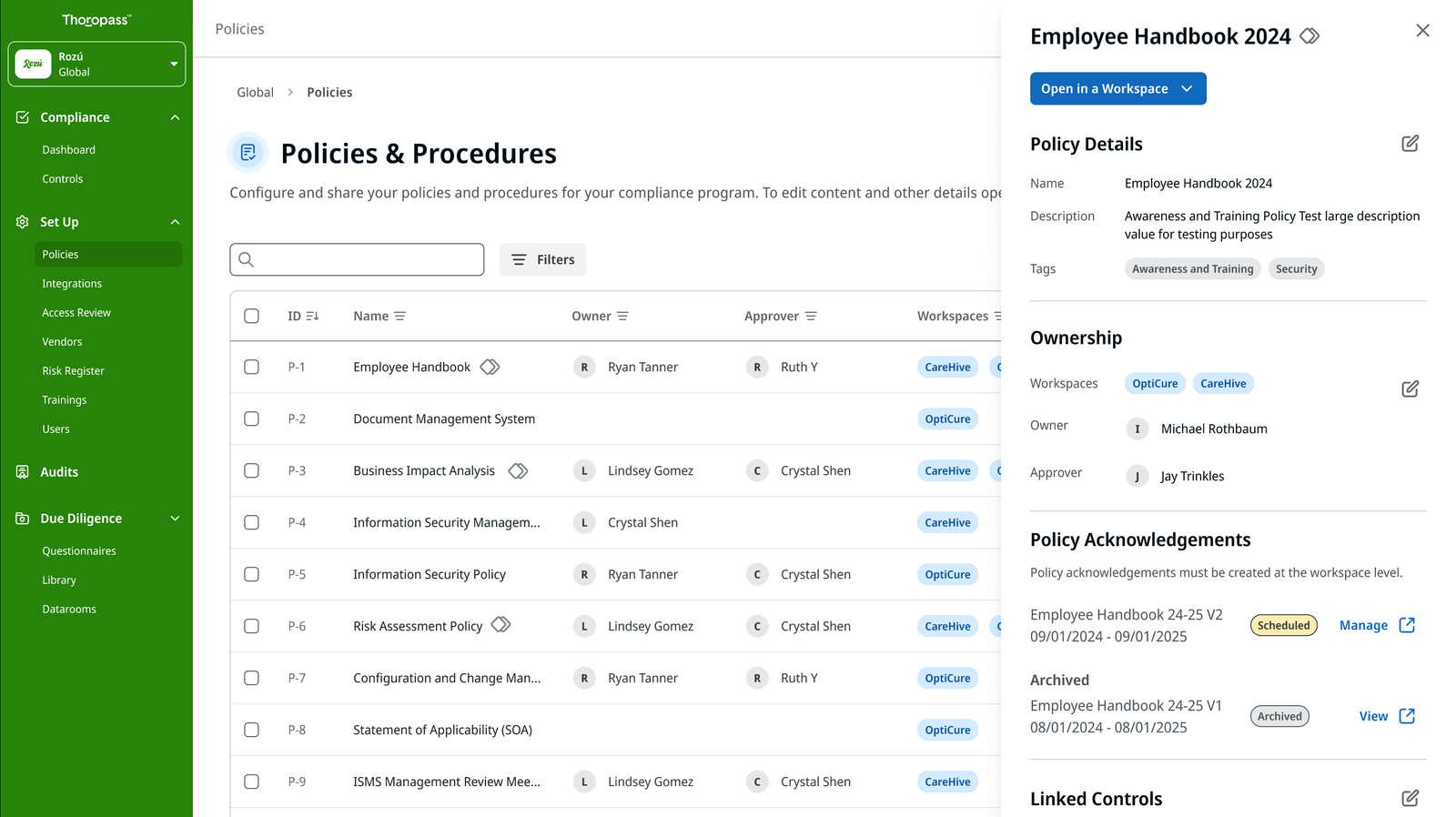
Policy Sharing
Policies are one of the most pervasive examples of something that needs to be shared across an enterprise, because of this it was one of the first items we tackled
Integration Sharing
Our integrations in Thoropass allow users to bring in data from external system and check that data against compliance requirements. There needed to be a way for users to both share an integration upon setup and editing.
Global Hub Dashboard
To satisfy the “bird’s eye view” I designed a single global hub dashboard.
It allows the user to see all workspaces, and on each workspace to view outstanding tasks and to take action on them.
Outcome & Lessons Learned
Outcome
Our workspace architecture allowed enterprise clients to separate compliance activities while sharing items across workspaces, reducing redundancy and enabling more tailored audits that aligned with their specific needs rather than requiring process adaptation.
While this was an MVP solution the foundational architecture and design patterns will allow this feature to expand through our product in the future.
Lessons
- This was the first major project for our team collaborate closely on. It required regular check-in with each vertical, aligning on work and strategy.
- Having more deep dives with customers and their actual audit workflow would have helped us get to our requirements faster.
- The experience can be confusing trying to retrofit the idea of workspaces onto an app designed for single instances per customer. More work needed to be scoped to make this a smoother experience.
- The mentality is that our large customers time was precious, when we could have taken the approach that their feedback was precious.
Overall, We had to work across silos to create and experience that was intuitive, user focused and comprehensive in scope. Without this collaboration, each team would be designing siloed experiences, not tied together by global concepts.

